How to create strong passwords is one of the first skills every beginner should master when stepping into the world of cybersecurity. Your password is the front door to your digital life, and a weak one is essentially an open invitation to attackers. According to Verizon's Data Breach Investigations Report, over 80% of hacking-related breaches involve stolen or weak credentials.
That statistic alone should make you reconsider whether "password123" is really protecting anything. This guide walks you through a practical, step-by-step approach to building passwords that actually resist modern attacks.
If you're just getting started with security fundamentals, understanding cybersecurity definitions, threats, and best practices will give you the broader context for why passwords matter so much. By the end of this tutorial, you'll have the knowledge to protect every account you own.
Key Takeaways
- Strong passwords use at least 16 characters combining letters, numbers, and symbols.
- Never reuse the same password across multiple online accounts or services.
- Passphrases built from random words are both strong and easier to remember.
- A password manager eliminates the burden of memorizing dozens of unique passwords.
- Two-factor authentication adds a second layer of protection beyond your password alone.
Step 1: Understand What Makes a Password Weak
Before you can build a strong password, you need to recognize why most people's passwords fail. The most common cyber threats targeting credentials rely on predictability. Attackers use automated tools that can test billions of combinations per second, and they start with the most obvious patterns: dictionary words, sequential numbers, and personal information. If your password contains your birthday, pet's name, or the word "password" itself, it can be cracked in seconds rather than centuries.
Short passwords are inherently vulnerable regardless of their complexity. A six-character password, even one mixing uppercase letters and symbols, can be brute-forced in under an hour with modern hardware. Length is actually more important than complexity when it comes to resisting brute-force attacks. Every additional character exponentially increases the number of possible combinations an attacker must try, which is why security experts now recommend a minimum of 16 characters.
Common Password Mistakes
Password reuse is arguably the most dangerous habit in online security. When you use the same password for your email, bank, and social media, a single breach exposes everything. Attackers routinely take credentials leaked from one site and test them against hundreds of others in a technique called credential stuffing. This is why unique passwords for every account are not optional; they are a fundamental requirement for basic protection.
Never use personal information like birthdays, addresses, or pet names in your passwords. Attackers scrape social media for exactly this data.
Another frequent mistake is making minor variations of the same base password. Changing "Summer2024" to "Summer2025" feels like progress, but pattern-based attacks catch these variations easily. Similarly, substituting letters with obvious symbols (like "@" for "a" or "3" for "e") is a well-known trick that modern cracking tools account for automatically. At the end of this step, you should be able to look at your existing passwords and identify which ones are genuinely at risk.
Step 2: How To Create Strong Passwords Using Proven Techniques
Now that you understand the weaknesses, let's build passwords that actually work. The gold standard for how to create strong passwords involves combining length, randomness, and character diversity. A truly strong password is at least 16 characters long, includes uppercase and lowercase letters, numbers, and special symbols, and follows no recognizable pattern. Random generation is your best friend here because humans are terrible at being truly random.
One effective approach is to let a random generator create your password. A string like "k9#Tz!mQ4v&xR2pL" is virtually uncrackable through brute force alone. The downside is obvious: nobody can memorize that. This is where the passphrase method becomes your most practical option, especially for the handful of passwords you actually need to type from memory, such as your computer login or your password manager's master password.
Generate truly random passwords for accounts you'll never need to type manually. Save them in a password manager and only memorize your master passphrase.
The Passphrase Method
A passphrase strings together four or more unrelated words into a phrase that's easy to remember but nearly impossible to guess. For example, "correct horse battery staple" (popularized by the webcomic XKCD) contains 28 characters and resists brute-force attacks far better than shorter complex passwords. The key is choosing words that have no logical connection to each other. "I love my dog" is a terrible passphrase because it's a common phrase. "Trumpet glacier Monday voltage" is excellent because those words have zero relationship.
You can strengthen a passphrase further by inserting numbers and symbols between the words. "Trumpet7!glacier*Monday2voltage" becomes a 31-character fortress that you can still recall after a few practice sessions. If you're learning to use AI tools to help brainstorm random word combinations, resources like this beginner guide to ChatGPT prompts can show you how to ask for useful outputs. After completing this step, you should have a method for generating unique, strong passwords on demand.
"Length beats complexity every time. A 20-character passphrase will outlast a 10-character jumble of symbols."
| Password Type | Example | Length | Estimated Crack Time |
|---|---|---|---|
| Simple word | sunshine | 8 | Under 1 second |
| Word with numbers | Sunshine99 | 10 | About 3 hours |
| Complex short | S!n9#kLm | 8 | About 8 hours |
| Random long | k9#Tz!mQ4v&xR2pL | 16 | Millions of years |
| Passphrase | Trumpet7!glacier*Monday2voltage | 31 | Billions of years |
Step 3: Use a Password Manager to Stay Organized
Knowing how to create strong passwords is only half the battle. The average person manages over 100 online accounts, and maintaining a unique, complex password for each one without help is practically impossible. This is exactly the problem password managers solve. These tools generate, store, and autofill your credentials so you only need to remember one strong master password. Everything else lives in an encrypted vault that only you can unlock.
Password managers like Bitwarden, 1Password, and KeePass offer different approaches to credential storage. Bitwarden is open-source and free for personal use, making it a solid beginner choice. 1Password provides a polished interface and family sharing features. KeePass stores everything locally on your device, which appeals to users who want full control over their data. All three options are dramatically safer than storing passwords in a text file, a browser's built-in manager, or (worst of all) your memory alone.
Choosing the Right Tool
When selecting a password manager, consider where authentication fits into your broader security setup. Modern authentication providers are becoming increasingly sophisticated. If you're exploring how authentication services work at a technical level, this overview of MCP auth providers offers useful context. For most beginners, the priority should be picking a reputable manager, setting a strong master passphrase, and actually migrating your existing accounts into it one by one.
Your password manager's master password is the single most important password you own. Make it a long passphrase and never write it down in an insecure location.
After completing this step, you should have a password manager installed on your primary devices, a strong master passphrase protecting it, and at least your five most important accounts (email, banking, primary social media) migrated into the vault. The process of migrating all your accounts will take time. Treat it as an ongoing project rather than a single afternoon task. Each time you log into an account, take 30 seconds to update the password and save it in your manager. Within a few weeks, your entire digital life will be properly secured inside an encrypted network of protection.
Step 4: Add Two-Factor Authentication for Extra Security
Even the strongest password can be compromised through phishing, keyloggers, or a data breach on the service provider's end. Two-factor authentication (2FA) addresses this reality by requiring a second form of verification beyond your password. With 2FA enabled, an attacker who steals your password still cannot access your account without also possessing your phone, security key, or biometric data. This single step blocks the vast majority of automated account takeover attempts.
Types of Two-Factor Authentication
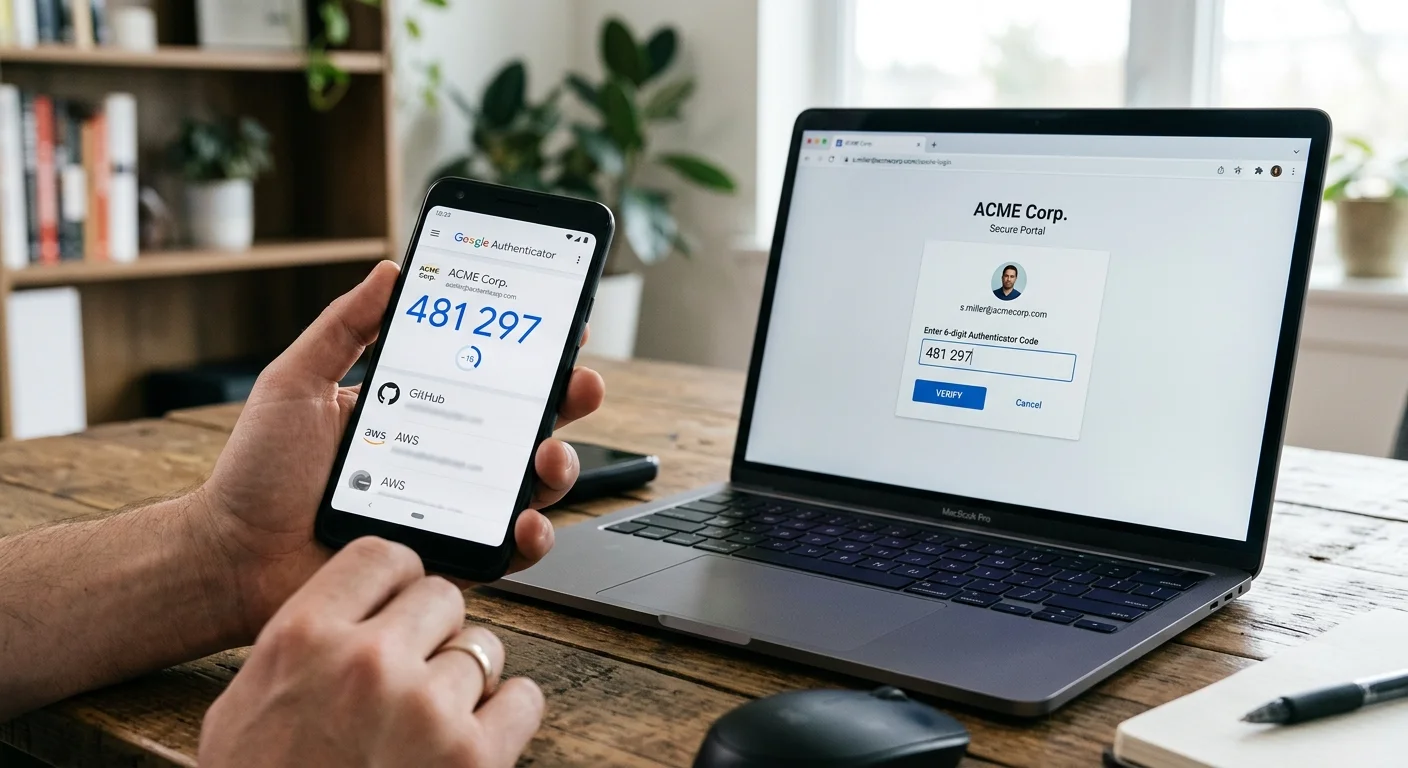
The most common 2FA method is a time-based one-time password (TOTP) generated by an app like Google Authenticator, Authy, or Microsoft Authenticator. These apps produce a six-digit code that changes every 30 seconds, and the code is tied specifically to your device. SMS-based 2FA (receiving a code via text message) is better than nothing, but it's vulnerable to SIM-swapping attacks where a threat actor convinces your carrier to transfer your number to their device. Whenever possible, use an authenticator app instead of SMS.
Hardware security keys like YubiKey represent the strongest form of two-factor authentication available to consumers. These physical devices plug into your USB port or communicate via NFC, and they're virtually immune to phishing because they verify the actual website domain during authentication. For a beginner learning cybersecurity basics, starting with an authenticator app is perfectly reasonable. Reserve hardware keys for your highest-value accounts like email, cloud storage, and financial services once you're comfortable with the fundamentals.
Enable 2FA on your email account first. Your email is the recovery method for almost every other account you own, making it the highest-priority target.
By the end of this step, you should have 2FA enabled on at least your primary email account, your password manager, and any financial accounts that support it. Check each service's security settings; most major platforms now offer TOTP-based authentication. The initial setup takes about two minutes per account. Store your backup recovery codes inside your password manager so you don't get locked out if you lose access to your authenticator device. This layered approach, combining strong unique passwords with a second verification factor, gives you a genuinely robust security posture that defeats the overwhelming majority of threats targeting personal accounts online.
Frequently Asked Questions
?How do I build a passphrase that's both strong and memorable?
?Is a passphrase actually stronger than a complex short password?
?How long does it really take to set up a password manager?
?Does changing 'Summer2024' to 'Summer2025' make my password safe again?
Final Thoughts
Learning how to create strong passwords is a foundational skill that protects everything you do online. Start by replacing your weakest passwords today, adopt a password manager this week, and enable two-factor authentication on your most important accounts before the month ends.
These steps don't require technical expertise or expensive tools. They just require the decision to stop relying on habits that attackers have been exploiting for decades. Your future self will thank you for the thirty minutes you invest right now.
Disclaimer: Portions of this content may have been generated using AI tools to enhance clarity and brevity. While reviewed by a human, independent verification is encouraged.