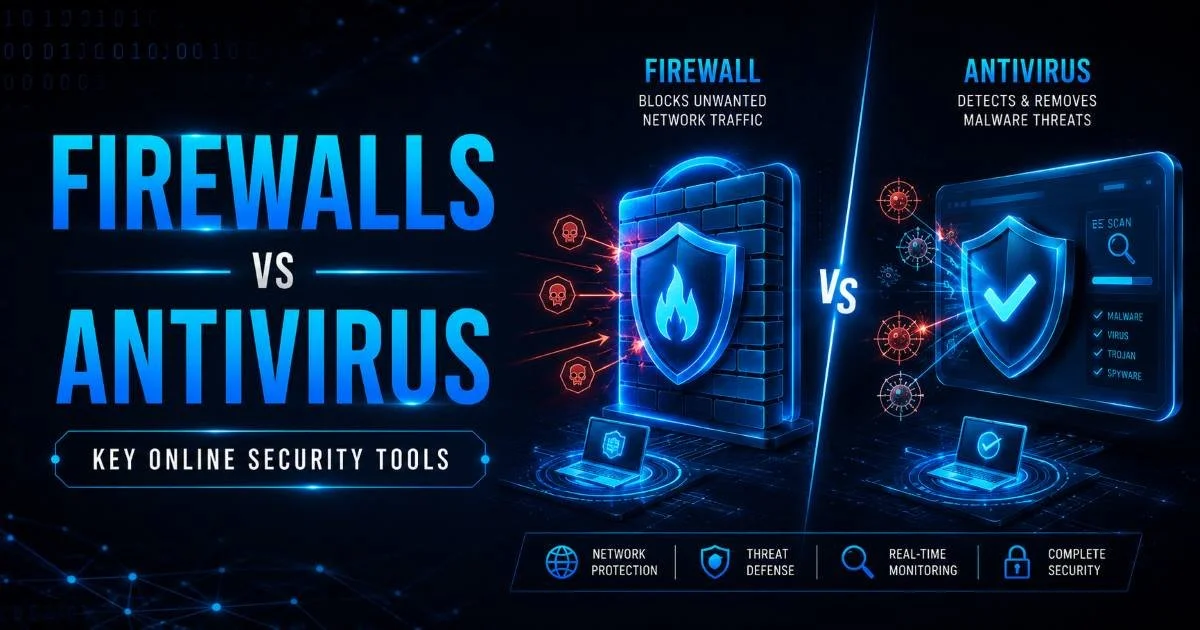
Firewalls vs antivirus software represent two of the most fundamental pillars of any security setup, yet many beginners confuse what each one actually does. A firewall monitors and filters network traffic coming in and out of your device, while antivirus software scans for malicious programs already on your system or attempting to install themselves.
Think of a firewall as the bouncer at the door and antivirus as the security guard patrolling inside the building. Both tools serve distinct purposes, and understanding their differences is the first step toward building a strong defense.
If you're just getting started with cybersecurity definitions, threats, and best practices, this comparison will give you practical clarity. By the end of this article, you'll know exactly when each tool protects you and why you need both.
Key Takeaways
- Firewalls filter incoming and outgoing network traffic before threats reach your device.
- Antivirus software detects, quarantines, and removes malware already on your system.
- Neither tool alone provides complete protection; you need both working together.
- Firewalls operate at the network level while antivirus works at the file level.
- Regular updates for both tools are essential to defend against new cyber threats.
What They Do: Firewalls vs Antivirus Explained
How Firewalls Work
A firewall acts as a gatekeeper between your device (or network) and the internet. It inspects packets of data traveling across the network and decides whether to allow or block them based on a set of predefined rules. Hardware firewalls sit between your router and the internet, protecting every device on the network. Software firewalls run on individual computers and give you granular control over which applications can send or receive data.
Firewalls are particularly effective at blocking unauthorized access attempts. If a hacker tries to connect to an open port on your machine, a properly configured firewall will reject that connection outright. For anyone managing a home setup, following firewall best practices can significantly reduce your exposure to network-based attacks. Stateful inspection firewalls track active connections and make smarter filtering decisions compared to basic packet-filtering models.
Enable your operating system's built-in firewall immediately if it isn't already active.
How Antivirus Works
Antivirus software focuses on threats that have already reached your device or are attempting to execute. It uses signature-based detection (matching known malware patterns), heuristic analysis (identifying suspicious behavior), and real-time scanning to catch malicious files. When you download an email attachment or plug in a USB drive, your antivirus is the tool examining those files for danger before they cause harm.
Modern antivirus solutions go beyond simple virus scanning. They detect ransomware, spyware, trojans, worms, and even potentially unwanted programs. Products like Windows Defender, Bitdefender, and Malwarebytes each take slightly different approaches, but they all share the core mission of identifying and neutralizing malicious code. Regular database updates keep these tools effective against the latest threats circulating online.
Protection Scope and Threat Coverage
When comparing firewalls vs antivirus in terms of what threats they actually stop, the distinction becomes clearer. Firewalls excel at preventing network-level attacks such as port scanning, denial-of-service attempts, and unauthorized remote access. They're your first line of defense against external intrusion. However, a firewall won't help much if you voluntarily download a malicious file from a website that appears legitimate.
Antivirus software picks up where the firewall leaves off. If a phishing email tricks you into opening an infected PDF, your antivirus can detect the embedded malware and quarantine it before it spreads. This is especially relevant given the top cyber threats every beginner should know, many of which rely on social engineering rather than brute-force network attacks. Antivirus handles the threats that slip past the perimeter.
"A firewall guards the door; antivirus catches what sneaks through the window."
Neither tool covers every attack vector on its own. Firewalls can't inspect encrypted traffic content without additional configuration, and they won't catch zero-day malware hiding inside legitimate-looking downloads. Antivirus, meanwhile, has no visibility into network traffic patterns or unauthorized connection attempts. Each tool has blind spots that the other compensates for, which is why cybersecurity professionals always recommend layered protection.
The chart above illustrates a rough effectiveness breakdown. Firewalls dominate when it comes to network-based threats like port scans and DDoS attacks, scoring above 85% effectiveness. Antivirus takes the lead against file-based threats like malware and ransomware. Note the overlap area: both tools contribute somewhat to protection against unauthorized access, but through completely different mechanisms. This complementary relationship is what makes running both tools together so important for online security.
No single tool offers 100% protection. Security is always about reducing risk through multiple layers.
Performance, Usability, and Cost
System Impact
Beginners often worry that running security software will slow down their computers. Firewalls, particularly software-based ones built into Windows or macOS, are lightweight and consume minimal system resources. They run quietly in the background, inspecting network packets without noticeable performance impact. Hardware firewalls have zero impact on your computer's performance since they operate on a separate device entirely.
Antivirus software tends to be more resource-intensive, especially during full system scans. A deep scan can temporarily spike CPU and disk usage, which is why most programs let you schedule scans during off-hours. Real-time protection features run continuously and can occasionally slow file operations, though modern antivirus engines have become much more efficient. Running regular security audits on your systems can help you spot performance bottlenecks related to your security tools.
Schedule full antivirus scans during nights or weekends to avoid performance slowdowns during work hours.
Cost Considerations
Cost is a practical factor for beginners building their first security setup. Most operating systems ship with a built-in firewall at no additional cost. Windows Firewall and macOS's application-level firewall both offer solid baseline protection. For advanced users, commercial firewalls like pfSense (open-source) or dedicated hardware appliances provide more granular control but require more technical knowledge to configure.
Antivirus pricing varies widely. Windows Defender comes pre-installed and free on Windows 10 and 11, offering surprisingly capable protection. Premium suites from Norton, Kaspersky, or Bitdefender typically cost $30 to $80 per year and bundle extras like VPNs, password managers, and dark web monitoring. For most beginners, starting with free built-in tools and upgrading later as your needs grow is a perfectly reasonable approach. Pairing good tools with strong passwords multiplies your protection significantly.
| Criteria | Firewall | Antivirus |
|---|---|---|
| Built-in Free Option | Yes (Windows, macOS, Linux) | Yes (Windows Defender) |
| Premium Cost Range | $0 to $500+ (hardware) | $30 to $80/year |
| CPU Usage | Very Low | Low to Moderate |
| Setup Difficulty | Easy (software), Moderate (hardware) | Easy |
| Update Frequency | Occasional rule updates | Daily signature updates |
| Best For | Network-level blocking | File and process scanning |
Using Both Together: A Layered Security Strategy
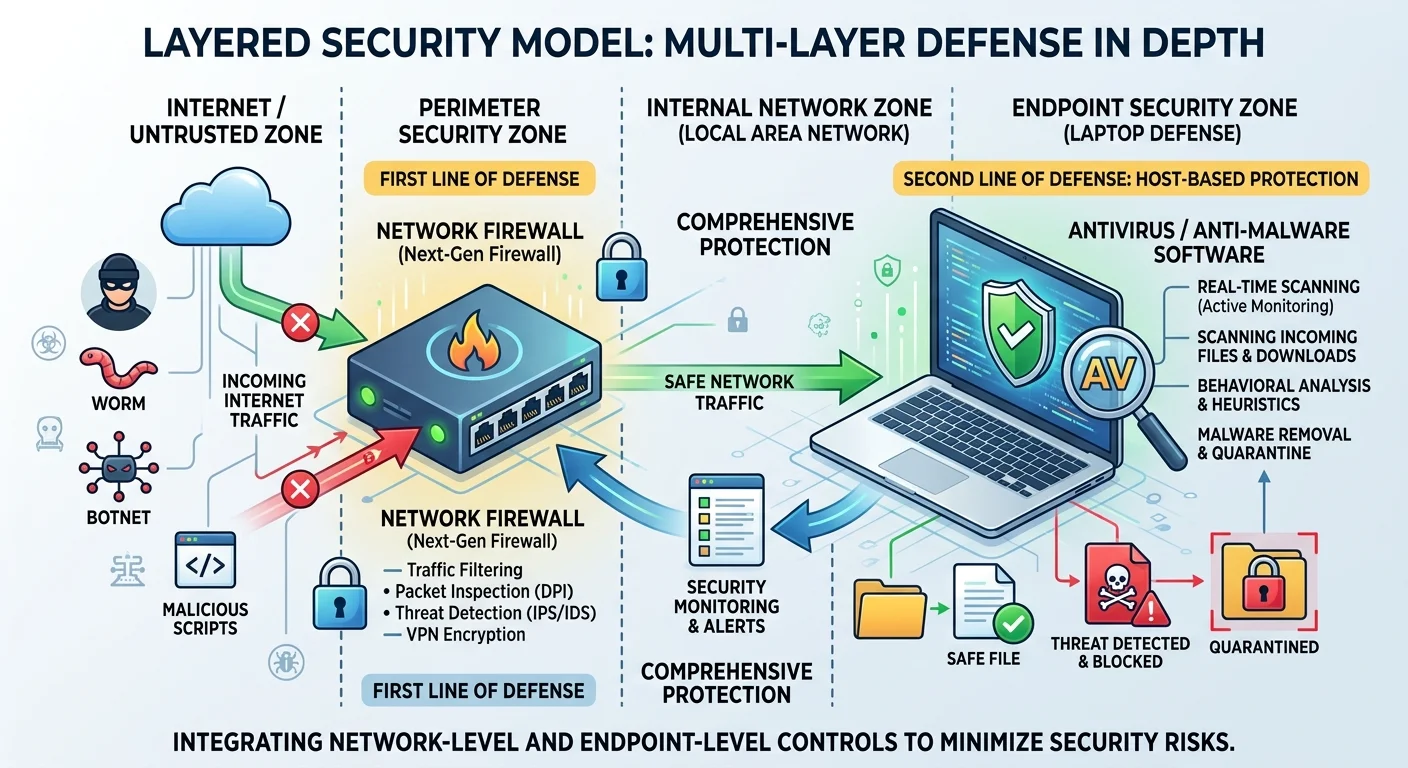
The firewalls vs antivirus debate shouldn't be an either/or conversation. Security professionals use a concept called "defense in depth," which means deploying multiple overlapping security controls so that if one fails, another catches the threat. Your firewall blocks suspicious traffic at the network boundary, and your antivirus catches anything malicious that makes it through to the file system. Together, they cover both major attack surfaces.
Consider a real-world scenario: you connect to a coffee shop's public Wi-Fi. Your firewall blocks unsolicited connection attempts from other devices on that network. But you then visit a compromised website that triggers a drive-by download. Your antivirus detects the downloaded file as malicious and quarantines it before it executes. Without the firewall, your device would have been exposed to direct attacks on the network. Without the antivirus, the malicious download would have run unchecked. This is exactly why home network protection tips always emphasize using both tools.
Public Wi-Fi networks are high-risk environments. Never connect without both an active firewall and updated antivirus.
Beyond firewalls and antivirus, a complete security posture includes keeping your operating system patched, using a password manager, enabling two-factor authentication, and maintaining regular backups. Think of firewalls vs antivirus as the foundation of your security architecture. They handle the most common threat vectors, but they work best as part of a broader strategy. Even developers maintaining legacy systems rely on these baseline protections while implementing more advanced security measures.
Getting your configuration right matters as much as having the tools installed. A firewall with overly permissive rules offers minimal protection, and antivirus software with outdated signatures won't catch recent threats. Review your firewall rules quarterly, keep automatic updates enabled for your antivirus, and run periodic scans even if real-time protection is active. Small maintenance habits like these separate a secure beginner from a vulnerable one. Building these routines early in your cybersecurity learning journey pays off enormously over time.
Frequently Asked Questions
?How do I check if my OS built-in firewall is actually active?
?Can antivirus software replace a firewall if it has network features?
?Does running both a firewall and antivirus noticeably slow down my PC?
?Is it a mistake to assume Windows Defender alone is enough protection?
Final Thoughts
Firewalls vs antivirus isn't a competition with a single winner. Both tools address different threat categories and complement each other perfectly. If you're a beginner, start by confirming that your operating system's built-in firewall is enabled and that you have active antivirus protection with up-to-date definitions.
From there, layer on good habits like strong passwords and regular updates. Your security is only as strong as your weakest point, so don't leave either side of this equation unprotected.
Disclaimer: Portions of this content may have been generated using AI tools to enhance clarity and brevity. While reviewed by a human, independent verification is encouraged.