Phishing attacks explained in plain terms: they are deceptive messages designed to trick you into handing over passwords, credit card numbers, or other sensitive data. Every day, billions of emails land in inboxes worldwide, and a surprising percentage of them are fraudulent. For beginner IT learners, understanding how phishing works is the first step toward building a strong security mindset.
These attacks don't require sophisticated hacking skills; they rely on human psychology, urgency, and trust. Whether you're just starting your career in cybersecurity or simply want to browse the web more safely, this guide walks you through practical steps to identify and avoid phishing.
If you want a broader foundation, our guide on what cybersecurity is, including common threats and best practices, is a great place to start. Let's break down exactly what you need to know and do.
Key Takeaways
- Phishing attacks use fake emails, texts, or websites to steal your personal information.
- Always verify the sender's email address before clicking any link in a message.
- Multi-factor authentication blocks most unauthorized access even if passwords are compromised.
- Reporting suspicious messages to your IT team helps protect your entire organization.
- Keeping software updated patches vulnerabilities that phishing campaigns commonly exploit.
Step 1: Recognize Phishing Attempts Before You Click
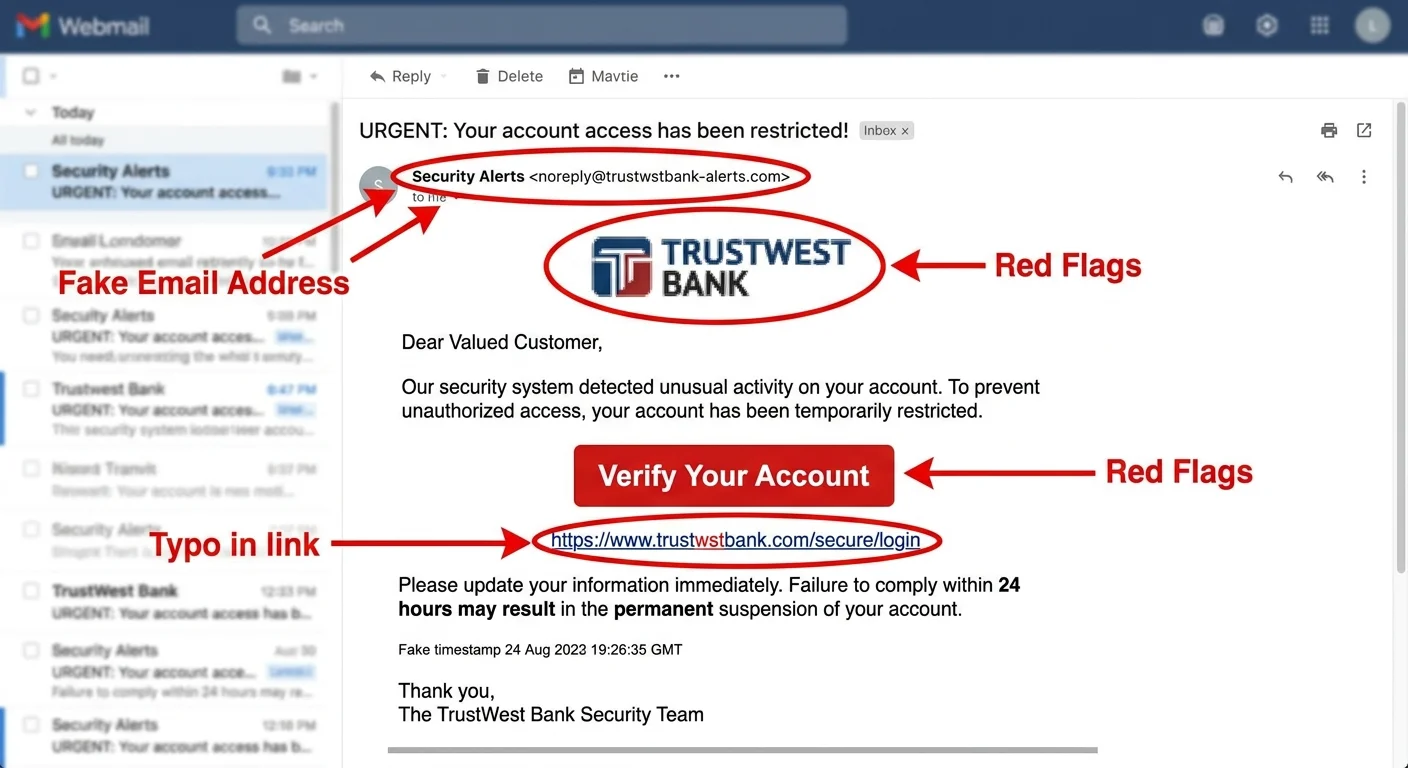
The foundation of online safety is learning to spot phishing before it does damage. Attackers craft messages that mimic trusted brands like banks, shipping companies, and social media platforms. They copy logos, use similar domain names, and write copy that sounds official. The goal is always the same: get you to click a link, open an attachment, or enter credentials on a fake website. Phishing is consistently ranked among the top cyber threats every beginner should know about.
Most phishing emails share telltale signs. The sender address may look almost right but contain an extra letter or use a public domain like gmail.com instead of a corporate address. The message often creates urgency, warning you that your account will be locked or that a payment failed. Grammar mistakes and generic greetings like "Dear Customer" instead of your actual name are also strong indicators. Train yourself to slow down when a message triggers an emotional reaction.
Common Red Flags in Phishing Messages
Look at the URL before you click it. Hover your mouse over any link and check the destination. If a message claims to be from your bank but the link points to "secure-banking-update.randomsite.com," that's a phishing page. Legitimate companies almost never ask you to confirm sensitive information through email. They also won't threaten immediate consequences for inaction in an unsolicited message.
On mobile devices, press and hold a link to preview the URL before tapping. This simple habit prevents most accidental phishing clicks.
Attachments are another attack vector. A PDF labeled "Invoice" or a Word document named "Urgent Contract" might contain malware that installs itself the moment you open the file. If you weren't expecting an attachment, don't open it. Contact the sender through a separate, verified channel and ask whether they actually sent the file. This five-second check can save you from a serious breach.
Step 2: Verify the Legitimacy of Every Suspicious Message
Once you spot something suspicious, the next step is verification. Never use the contact information provided inside the suspicious message itself. Instead, go directly to the company's official website by typing the URL into your browser manually. Call the customer service number listed on the real website if necessary. This approach breaks the attacker's trap because you're bypassing the fraudulent link entirely.
Email headers contain useful information that most people ignore. In Gmail, click the three dots next to the reply button and select "Show original." In Outlook, open the message properties. Look at the "Return-Path" and "Received" fields. If the email claims to be from a major retailer but was actually sent from a server in an unrelated country, that's strong evidence of phishing. With phishing attacks explained at this level, even beginners can start performing basic forensic checks.
Tools and Techniques for Verification
Free tools can help you analyze suspicious URLs and files. VirusTotal lets you paste a URL or upload a file to scan it against dozens of antivirus engines simultaneously. Google's Safe Browsing transparency report shows whether a site has been flagged for hosting malware or phishing pages. These tools take seconds to use and provide an extra layer of confidence before you interact with anything questionable. Organizations also benefit from API protection against bots and abuse, which can help stop automated phishing at scale.
No verification tool is 100% accurate. Brand-new phishing pages may not yet appear in threat databases, so always combine tool checks with your own judgment.
For workplace scenarios, your IT or security team should be your first point of contact. Most companies have a dedicated email address or button for reporting suspicious messages. Don't feel embarrassed about reporting something that turns out to be legitimate. Security teams would rather investigate ten false alarms than miss one real attack. Building this habit creates a culture of network protection that benefits everyone in the organization.
Step 3: Strengthen Your Defenses With Layered Protection
Recognizing phishing is only half the battle. You also need technical defenses that limit the damage if an attack slips through. Think of security as a series of barriers, not a single wall. Each layer you add makes it harder for attackers to succeed. This approach, sometimes called defense in depth, is a core principle of cybersecurity that applies to individuals and organizations alike.
"Phishing exploits human trust more than technical weakness, so your best firewall is a trained, skeptical mind."
Essential Security Layers
Start with multi-factor authentication (MFA) on every account that supports it. MFA requires a second form of verification, typically a code from an app or a hardware key, in addition to your password. Even if a phishing page captures your password, the attacker still can't log in without that second factor. According to Microsoft, MFA blocks over 99.9% of automated account compromise attacks. That single change dramatically reduces your risk.
| Security Layer | What It Does | Difficulty to Set Up |
|---|---|---|
| Multi-Factor Authentication | Requires a second verification step beyond passwords | Easy |
| Email Filtering | Blocks known phishing emails before they reach your inbox | Easy |
| Password Manager | Generates unique passwords; won't autofill on fake sites | Easy |
| Endpoint Antivirus | Scans attachments and downloads for malware | Easy |
| DNS Filtering | Blocks connections to known malicious domains | Moderate |
| Security Awareness Training | Teaches employees to recognize and report phishing | Moderate |
A password manager deserves special attention here. Tools like Bitwarden or 1Password store unique, complex passwords for each site. The key anti-phishing benefit is that a password manager checks the domain before autofilling credentials. If you land on "paypa1.com" instead of "paypal.com," the manager won't fill in your password, alerting you to the fake site. Understanding how tools like firewalls and antivirus software differ also helps you build a well-rounded defense. Keep all your software updated, too; patching known vulnerabilities is one of the simplest things you can do for protection.
Your home network matters just as much as your device. Attackers sometimes use phishing to gain a foothold on one device and then move laterally across a network. Changing your router's default credentials, enabling WPA3 encryption, and segmenting IoT devices onto a separate network all reduce this risk. For more practical guidance, check out these home network protection tips for online security. Additionally, if you manage legacy systems, properly refactoring legacy code can close security gaps that phishing campaigns target.
Never reuse passwords across multiple accounts. A single phished password can unlock your email, banking, and social media if they all share the same credentials.
Step 4: Respond Quickly and Report Phishing Incidents
Even with strong awareness and solid defenses, mistakes happen. Maybe you clicked a link before your brain caught up, or you entered your credentials on a page that looked perfectly legitimate. The speed of your response matters enormously. A fast reaction can contain the damage and prevent the attacker from exploiting your information further. Having phishing attacks explained and practiced through simulations beforehand makes real incidents far less stressful to handle.
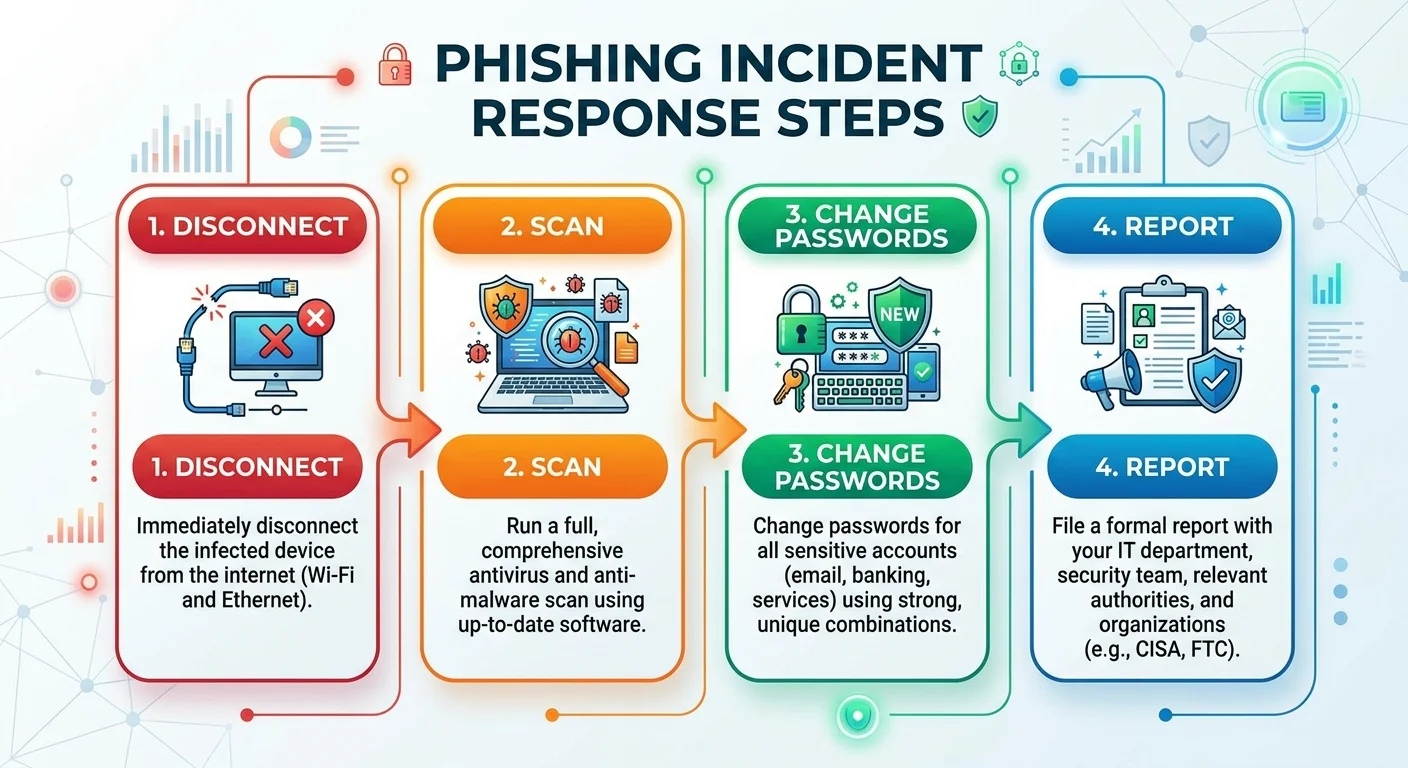
If you clicked a suspicious link but didn't enter any information, close the browser tab immediately and run a full antivirus scan. Clear your browser cache and cookies. Monitor the situation for a few days, watching for unusual account activity. If the link downloaded a file, disconnect from the internet, scan your device, and consider reimaging the machine if you're in a corporate environment. Speed is your biggest advantage in these moments.
What to Do If You Already Clicked
If you entered credentials on a phishing page, change the password for that account immediately. Then change passwords on any other accounts where you used the same or similar credentials. Enable MFA if it wasn't already active. Check your account's recent activity for unauthorized logins, email forwarding rules, or changes to recovery settings. Attackers often set up mail forwarding to maintain access even after you change your password, so inspect those settings carefully.
Reporting matters more than most people realize. When you report a phishing email to your IT department, email provider, or a government agency like the Anti-Phishing Working Group (reportphishing@apwg.org), you contribute to threat intelligence that protects millions of other users. Google blocks over 100 million phishing emails daily in Gmail because users report them. Your single report can help update filters that stop the same campaign from reaching thousands of other inboxes.
Finally, treat every incident as a learning opportunity. After the immediate threat is contained, review what happened. What made the phishing message convincing? What could you have done differently? Share your experience with colleagues, friends, or family. Phishing attacks explained through real stories stick with people far more than abstract warnings. This cycle of awareness, defense, response, and reflection is what separates beginner learners from confident practitioners.
Frequently Asked Questions
?How do I safely check a suspicious link without clicking it?
?Does multi-factor authentication stop all phishing attacks?
?How long does it take to report a phishing email to my IT team?
?Can a phishing attachment cause damage if I open it but enter no data?
Final Thoughts
Phishing attacks remain one of the most common and effective cyber threats because they target people, not systems. The good news is that awareness and simple habits offer powerful protection. Verify before you click, use multi-factor authentication, and report anything suspicious.
No single tool will make you immune, but layering smart practices together makes you a much harder target. Stay curious, keep learning, and remember that every small security step you take compounds over time into a much stronger online defense.
Disclaimer: Portions of this content may have been generated using AI tools to enhance clarity and brevity. While reviewed by a human, independent verification is encouraged.